Build your first chatbot agent in 5 minutes. No code, one minute a step, a picture for every step.
You can build your first chatbot agent in 5 minutes without writing any code. SimplyBoost's how-to guides take you from sign-in to a live agent in five steps of one minute each, with a picture of every screen and the exact words to click or type. Pick the guide that matches what you want to build: a Shopify chatbot, your first AI agent, a lead capture agent, a Shopify bot that sells or Instagram auto DM. When you are live, optional steps help you make it yours.
- No code
- 5 minutes from sign-in to live
- A picture for every step
Do you ship to Belgium?
We do. Next day to Belgium, free over €50. Want me to check a postcode?
Source: Shipping · 5 minutes from sign-in to live
Which guide do you need?
Each one is five steps of one minute each. Start with the one that matches your goal.

Part 1 of 5 · 5 minutes · No code
How to build a Shopify chatbot
Connect your store, switch on the chat in your theme and test it with a real order.
- 1.Create your account and choose Shopify
- 2.Connect your store
- 3.Check what it learned from your store
- 4.Switch the chat on in your theme
- 5.Ask it three questions
Read the guide
Part 2 of 5 · 5 minutes · No code
How to build your first AI agent
Add your website, pick a tone, test it and put it live.
- 1.Create your account and choose Website
- 2.Add your website
- 3.Name it and pick a tone
- 4.Ask it a question
- 5.Put it on your site
Read the guide

Part 3 of 5 · 5 minutes · No code
How to build a lead capture agent
An agent that asks for contact details by itself and rates every lead.
- 1.Create an agent with the goal Get more leads
- 2.Add your website
- 3.Choose which details to collect
- 4.Test it with your own email
- 5.Put it on your site
Read the guide

Part 4 of 5 · 5 minutes · No code
How to create a Shopify bot that sells
Product advice, carts and cart recovery, set up in five minutes.
- 1.Connect your store
- 2.Give the agent the Shopping assistant role
- 3.Switch on cart recovery
- 4.Switch the chat on in your theme
- 5.Walk through a shopper's journey
Read the guide
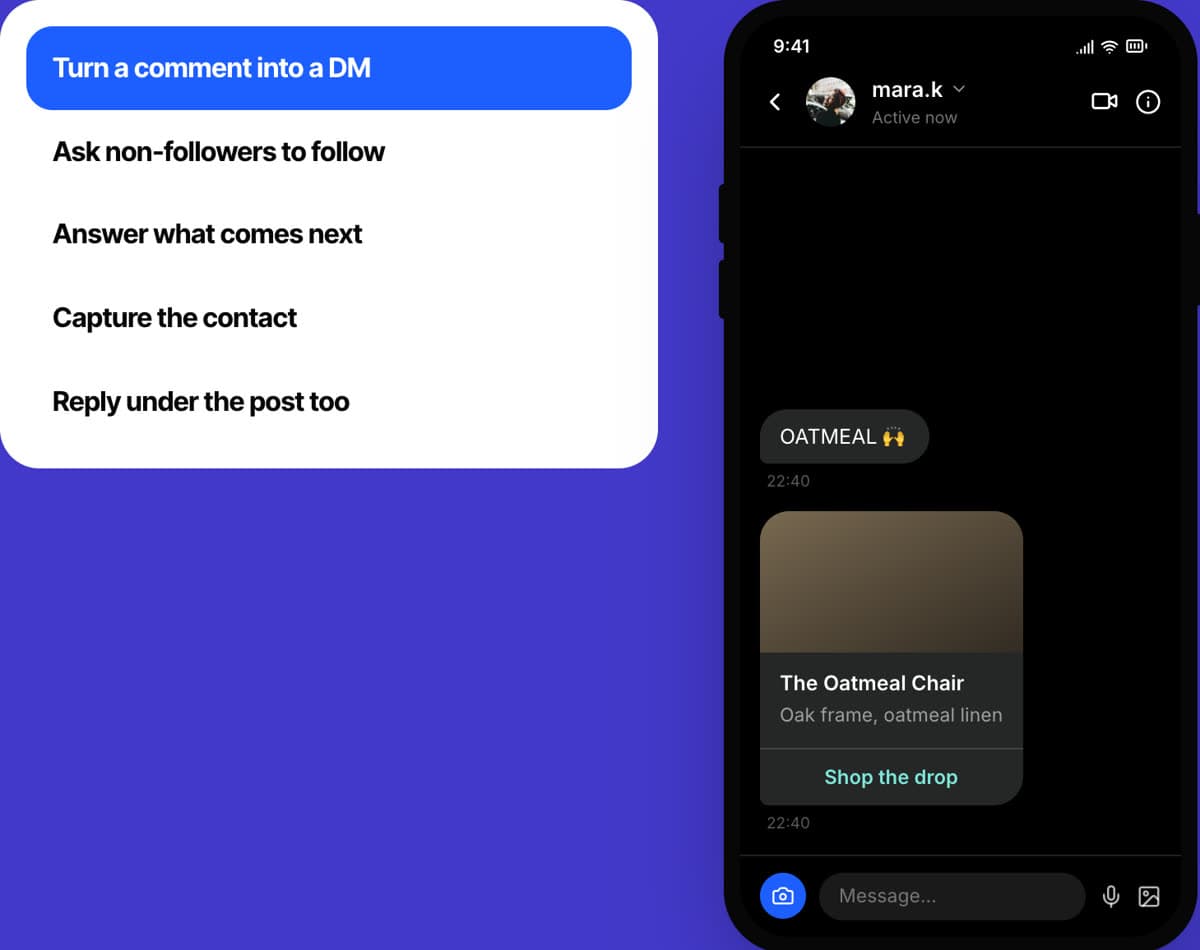
Part 5 of 5 · 5 minutes · No code
How to set up Instagram auto DM
Send a DM with a link to everyone who comments your keyword.
- 1.Create your account and choose Instagram
- 2.Connect Instagram
- 3.Start a rule from a template
- 4.Type your keyword and your message
- 5.Choose where it applies, save and test
Read the guide

Build your first chatbot agent in 5 minutes.
No code. 5 minutes from sign-in to live. A picture for every step.
Start free for 7 days
The five minutes, step by step
This is the path in "Build your first AI agent". The other guides follow the same shape. Click a step to see its screen.
- 1 min
Create your account and choose Website
Choosing Website creates your first agent for you.
- 1 min
Add your website
This is the agent's knowledge. It answers from this and nothing else.
Train › Knowledge Base
- 1 min
Name it and pick a tone
Three choices, and they save by themselves.
Train › Optimize
- 1 min
Ask it a question
The preview sits right beside your settings.
Train › Optimize
- 1 min
Put it on your site
WordPress, Wix and Shopify have their own button. Anything else takes one copy and paste.
Deploy › Widget
How every guide works
The same simple shape each time, so the second one feels easy.
Five steps, one minute each
The path from sign-in to live is five steps, and each takes about a minute. The total is on top of every guide.
A picture of every screen
Each step shows the screen you will see, with the one thing to click or type marked in yellow and where to find it in the app.
Nothing to code
Every step is a click or a typed word. The most you ever do is paste one line in the footer of a site that is not WordPress, Wix or Shopify, and the panel gives you that line.
Extras for after you are live
Names, voices, rules, calendars and results come after the five minutes, as optional steps, so you can go live first and polish later.
What do you want to build?
Pick the row that sounds like you.
| You want to | Start with | Time |
|---|---|---|
| Answer customers on your website from your own pages | Build your first AI agent | 5 minutes |
| Answer where is my order, returns and product questions on Shopify | Build a Shopify chatbot | 5 minutes |
| Collect names and emails during the chat and rate every lead | Build a lead capture agent | 5 minutes |
| Recommend products, build carts and win back abandoned carts | Create a Shopify bot that sells | 5 minutes |
| Send a link to everyone who comments a keyword on Instagram | Set up Instagram auto DM | 5 minutes |
Read these first
Short pages that make every guide quicker.

What a no-code AI agent is
What no code means here, what you can build in five minutes and when you would want code.
Read it

Knowledge base checklist
What to add before you go live, what to leave out and how much fits.
Read it

25 questions to test your AI agent
A test script for shops, leads and handover, with what a good answer looks like.
Read it
Is five minutes realistic?
Yes. Customers set up their first agent in about five minutes by following these steps. A website or a PDF is read in about a minute, the agent answers from it straight away, and WordPress, Wix and Shopify each install with their own button. We keep the things that take longer out of the five minutes on purpose: a very large website takes longer to read, and WhatsApp goes through Meta's own sign-up. Those come later, as optional steps.
The five minutes start at sign-in. The free trial lasts 7 days and includes 100 AI replies, which is plenty to build the agent and test it properly. See the pricing page for what each plan includes after that.
Questions about the guides
About 5 minutes from sign-in to a live agent, and customers do it. Each guide has five steps of one minute each: sign up, add your content, set the basics, test it and put it live.
No. Every step is a click or a typed word. WordPress, Wix and Shopify install with a button, and any other site takes one line pasted in the footer.
You never write or edit code. You choose options, type your own words and add your content. The no-code AI agent page explains it step by step.
A website, a PDF or a few lines of text for the agent to learn from, and five minutes. The Shopify guides also need a Shopify store you can open as an admin, and the Instagram guide needs a Business or Creator profile.
Start with the one that matches your goal. If you are unsure, build your first AI agent: it teaches the same five steps the other guides use.
Yes. Every account starts with a 7-day free trial with 100 AI replies.
You are live. Each guide then lists optional steps for naming, tone, rules, calendars and results, and the Missing answers list shows what customers ask that the agent could not answer yet.
Keep reading
AI chatbot builder
The same setup from the product's point of view.
Read it
The platform
What the agent does once it is live.
Read it
Quick setup in the docs
The five setup steps with every setting.
Read it
Pricing
Starter, Growth and Pro, and what each includes.
Read it
This page in other languages: Nederlands, Deutsch
Try SimplyBoost with your own content
Start a 7-day free trial with 100 AI replies. Add your website, install the widget and see how the agent answers your customers.
See pricing- 7 days, 100 AI replies
- From €39 a month
- Hosted in Europe